When someone needs a dentist, an accountant, or an insurance agent nearby, they usually search on their phone, glance at a map, tap a few listings, and check a website or two before calling or emailing. Your office is being judged in those few seconds, often before anyone has spoken to you.
That doesn’t mean you need a flashy website or a marketing budget. For most small offices, “good” is modest and achievable: accurate information everywhere, a fast and clear site, and a complete Google Business Profile. This guide covers why that matters and what it looks like.
Two front doors: your website and your Business Profile
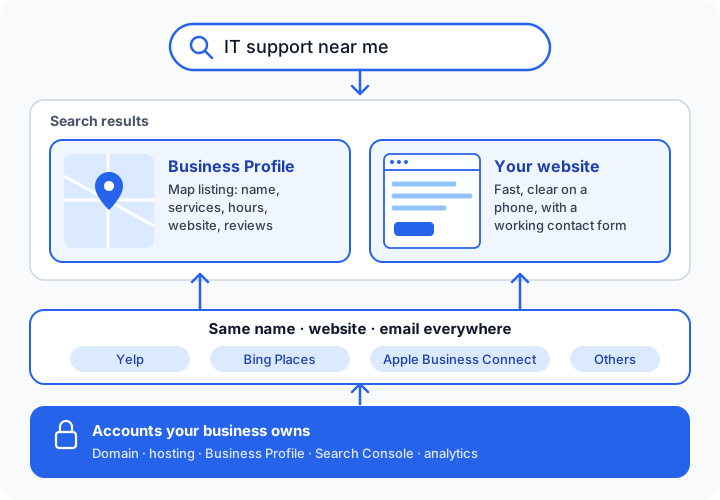
For local searches, Google often shows a map with a short list of businesses before any ordinary website results. Those listings come from Google Business Profiles. Your website is the second front door: people click through to confirm you’re legitimate, check services, and find out how to contact you.
The two work together. Your profile links to your site, and your site confirms what your profile says. When they disagree (different hours, an old address, a dead phone number or contact form), people lose confidence quickly.
What Google says drives local results
Google publishes a short, plain explanation. Local results are based mainly on three things (Google Business Profile Help):
- Relevance: how well your profile matches what someone searched for. Complete, detailed information helps.
- Distance: how far you are from the searcher, or from the location in their search. You can’t change this.
- Prominence: how well-known your business is, based on things like links to your business across the web and your reviews.
Google also states that complete, accurate, verified information makes a business more likely to appear, and that there’s no way to request or pay for a better local ranking. That’s worth remembering whenever someone promises “page one in 30 days.”
What a good small-office website looks like
You don’t need many pages. You need the right ones, done well.
- Clear on a phone. Most local searches happen on phones. Text should be readable without zooming, and buttons should be easy to tap.
- Fast. A small, simple site should load almost instantly. Large images and heavy page builders are the usual culprits when it doesn’t.
- Obvious answers. Within a few seconds a visitor should know what you do, where you serve, and how to contact you.
- A contact method that works. Test your contact form. Forms that quietly go nowhere are more common than you’d think.
- Secure. The address should start with
https://and show no browser warnings. - Honest and specific. Real services, real hours, real areas served. Avoid stock claims you can’t back up.
- Readable by search engines. Google’s own guidance is to create helpful, people-first content and use the words people actually search for in titles, headings, and link text (Google Search Essentials). Its starter guide is refreshingly blunt: there are no secrets that will automatically rank a site first (Google SEO Starter Guide).
Structured data is one of the few technical extras worth doing for a local office. It’s a small block of code that tells search engines your business name, services, and area in a format they can read reliably (Google: LocalBusiness structured data). Visitors never see it, but it removes guesswork.
What a good Business Profile looks like
- Verified and claimed by you, under an account your business controls.
- The most specific accurate category, plus your real services.
- Accurate hours (including holidays), service area or address, website, and contact details.
- A short, plain description of what you do and who you serve.
- Real photos of your office or work. No stock images.
- Reviews you respond to. Ask happy clients for honest reviews, and reply politely to all of them. Never buy or fake reviews; it breaks Google’s rules and erodes trust.
The accounts problem
Here’s a quieter issue that causes real headaches. Many small offices discover their domain, website, or Business Profile is registered to a former employee, an old web designer, or someone’s personal email. When that person is unreachable, simple changes become impossible.
A hypothetical: a three-person office wants to update its hours and move its website. The domain was registered years ago by a designer who has since closed their business, and the Business Profile was claimed by a former office manager. Recovering both takes weeks of verification steps, all for a change that should have taken minutes.
The fix is simple, and best done before you need it: your domain, website host, Business Profile, Search Console, and analytics should all be owned by accounts your business controls, with outside helpers added as users who can be removed.
A quick self-check
- Search for your business on your phone. Is everything in your profile correct, including hours and website?
- Does your website load quickly on a phone and say clearly what you do and where?
- Have you sent yourself a message through your own contact form recently?
- Do you know who owns your domain and Business Profile, and can you log in to both?
- Is your site verified in Google Search Console, so you’d see indexing problems?
- Do your name, website, and contact details match across your site, profile, and major directories?
If two or more of those are “no” or “not sure,” a small amount of cleanup will likely go a long way.
How we’d solve this
If you hire InstallMyTech for Website Development and SEO, here’s what to expect. Every job gets a written, fixed-price quote first, and everything is set up in accounts you own.
- Local SEO setup ($399): we review and complete your Google Business Profile, verify Google Search Console and Bing Webmaster Tools with your sitemap, add LocalBusiness structured data to your site, check name and website consistency on major directories, and give you a written summary of every change.
- Website refresh or migration ($599–$1,200): mobile and speed fixes, clear titles and descriptions, a working contact form, HTTPS, and redirects from old pages, with local SEO setup included.
- Small-office website ($1,200–$2,000): a new site of up to 5 pages, mobile-first and fast, with structured data and local SEO setup included.
- Optional website care ($49/month): updates, backups, uptime and form checks, and small edits, month-to-month.
Domain, hosting, and any platform fees are billed to you directly by the provider. We can’t promise rankings, because nobody honestly can. We can promise a complete, accurate, fast presence that gives you the best footing.
Where to go from here
Get in touch for a fixed-price quote on website or local-search work. A free 30-minute IT check is also available if you’d rather start with a conversation; it can include a quick look at your website and Business Profile, with a short, plain-English list of what’s fine, what to fix, and what can wait.